Invitation flow confuses new users: the email describes a step that doesn't exist
The invitation email tells new users to create an account, then come back to the email and accept. That second step doesn't exist: after "Join", they are already in. Both buttons open the same sign-up page, which shows neither their email, nor who invited them, nor their role. The subject can't be edited and reads like spam in French, and the email lands in Gmail Promotions. Clients get lost at their very first contact with the platform, to the point that I send a separate email with every invitation to explain what to click. For a white-label product, that first impression looks unfinished.
What happens today (tested on a demo organization, with an address that has no account and one that has an account)
Sending the invitation
The Manager role is preselected, and comes back after each invitation sent.
The pending invitations list shows the email and the time sent, but not the role or the locations, so there is no way to check what was sent.
The email
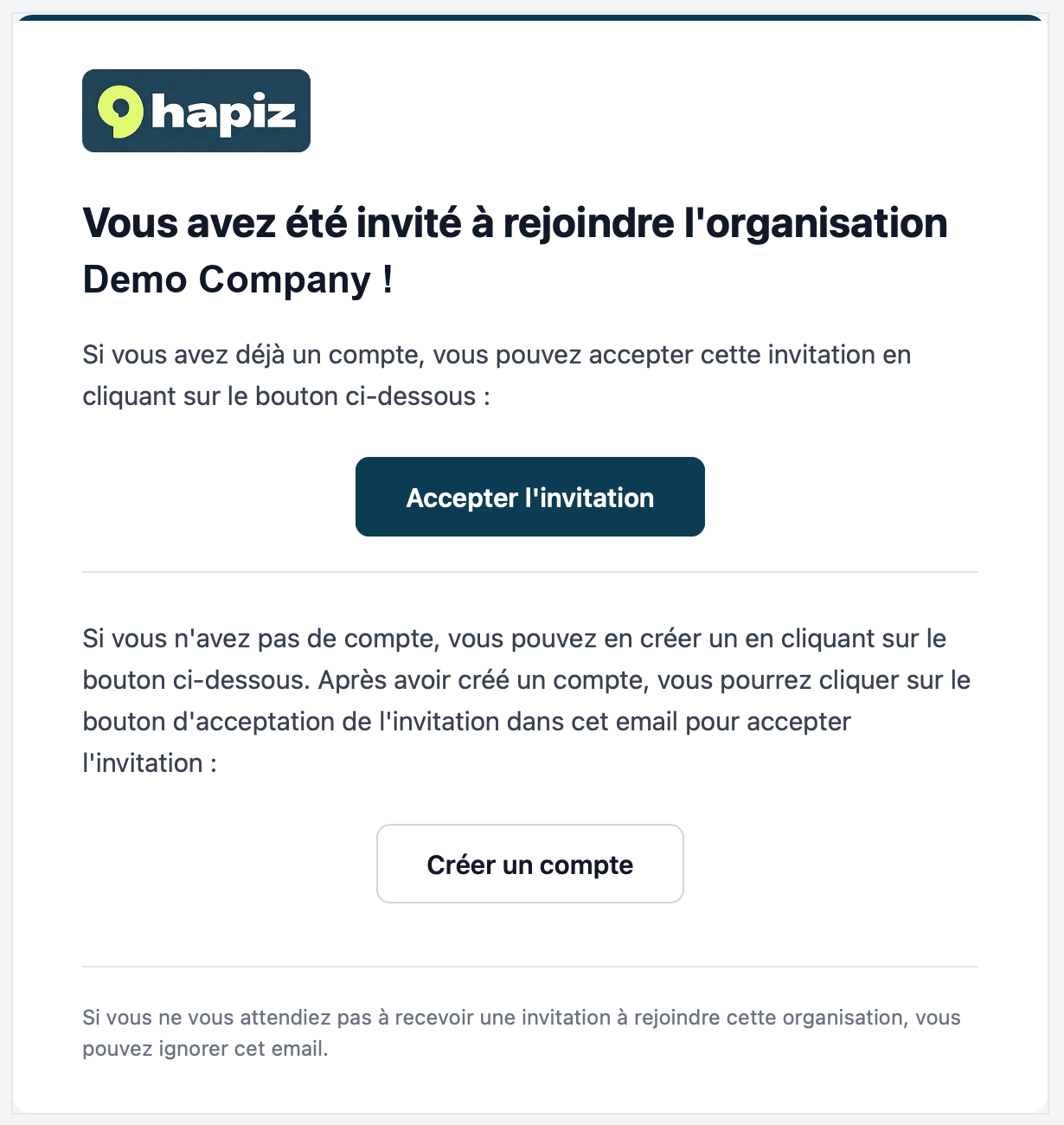
The same email goes out whether or not the address already has an account: an "Accept invitation" button, a "Create account" button, and the sentence "after creating an account, you can click the accept button in this email".
The subject is fixed: "Demande à la gestion de la réputation : <organization>" in French. It cannot be edited, and no personal message can be added.
The email does not say who sent the invitation, which role it gives, or which locations the user will see.
What the invited user sees
No account yet: both buttons open "Join <organization> / Create your account to get started" (name, password, confirm). After "Join", the user lands on the dashboard, logged in and already a member.
Existing account, logged out: "Accept invitation" opens the standard login page, with no mention of the invitation. "Create account", and the link copied from the pending list, open the same account creation form as for a new address.
Two pages stay in English when French is selected: "This invitation is for a different account" and "This invitation link is no longer active".
Proposal
One email adapted to the recipient: a single "Join <organization>" button for a new address, a single "Log in to accept" button for an existing account, and copy that matches the real flow.
Show who invited the user, the role and the locations, in the email and on the join page, along with the invited email address.
When the login page is reached from an invitation, say so ("Log in to join <organization>"), and make the copied link adapt to whether the address already has an account.
Let the agency edit the subject and add a short personal message, per language. At minimum, a natural French subject such as "Invitation à rejoindre <organisation>".
When sending: no preselected role (or the most limited one by default), and the role and locations shown in the pending list.
Translate the two pages that stay in English.
Screenshot: current invitation email in French (organization name replaced).
Log in to comment and vote
No comments yet
Be the first to share your thoughts.