What's new: a rebuilt website builder and multi-location reporting
September 2026
Two big updates this month.
The white-label website builder has been rebuilt from the ground up, and multi-location customers now get proper per-branch reporting on their dashboards and in their reports.
Nothing changes for websites you already have. Your pages, blocks and content are exactly as you left them.
Everything below is available the next time you open the Website section.
Website Builder
A new starter website
Start with a site that sells what you sell.
The starter website has been rewritten for today's product.
When you create a new site, you now get nine pages:
Home
Features
Pricing
Integrations
About
Contact
Terms
Privacy
Cookie Policy
The copy covers:
Automated review requests
AI Review Assistant
Auto-respond for new and old reviews
AI Insights
Local Search Grid
Widgets
Video testimonials
It is written for a business owner reading your site, not for a software audience, and avoids hype.
Your company name, contact email, site address and business address, where one is on file, are filled in automatically, including inside the legal pages.
Anything we cannot fill in for you is left as a clearly visible "Insert" marker so you know what still needs your attention.
If you already have a display widget, the home page includes a live reviews section from day one.
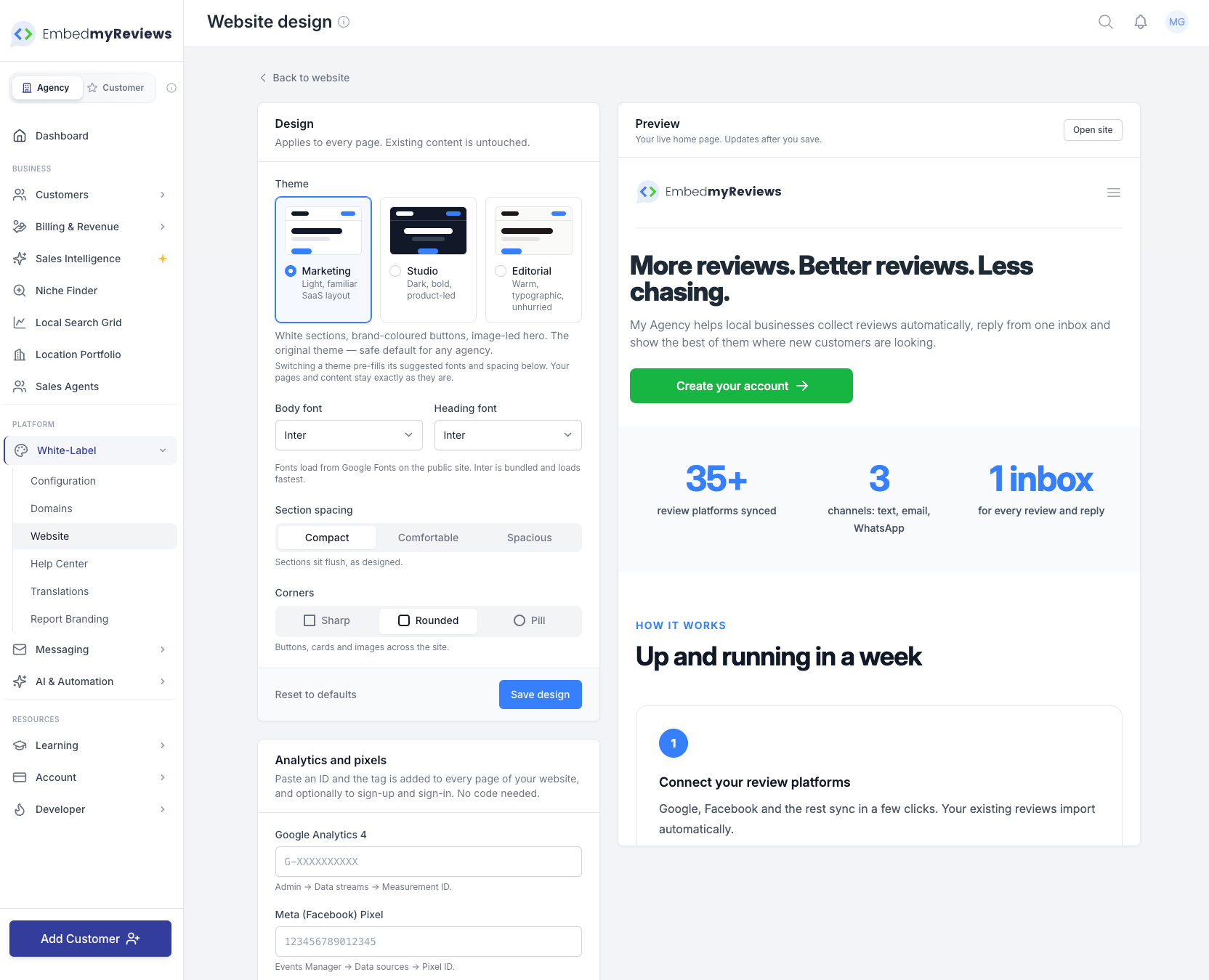
Three website themes
You can now choose between three completely different styles.
Marketing
The light, familiar layout you already know.
Studio
Dark and bold, with a glow in your brand colour. Designed to feel like a serious software product.
Editorial
A warmer, typographic style with serif headlines that feels more like a boutique consultancy.
Switching theme never touches your content.
More design controls
Under Website → Design, you can now control:
Body font
Heading font
Section spacing
Button roundness
Card roundness
A live preview sits beside the controls so you can see changes immediately.
The defaults look exactly like your site does today.
Draft and publish
Editing a page no longer changes the live site straight away.
Save keeps your changes as a draft.
Publish makes them live.
Preview a draft before anyone else sees it.
See which pages are live, drafts or have unpublished changes.
Every publish keeps the previous version so you can restore it if something goes wrong.
Turn your website off without deleting it
If you use your own website, you can now switch the built-in website off.
When disabled:
Your domain sends visitors to the login page.
All your pages and content are kept.
You can switch the website back on at any time.
New website blocks
The following new blocks work across every theme:
How It Works
Explain your process in a simple step-by-step format.
FAQ
Add frequently asked questions, including search-engine-friendly FAQ markup.
Stats
Highlight important numbers and results.
Integrations
Display integration logos automatically from the platform's own integration list.
Comparison Table
Compare plans, features or services side by side.
Testimonial
Add a testimonial with a star rating and customer photo.
Book a Call
Embed Calendly or Cal.com directly into your page.
Free Report Lead Magnet
Let visitors request a report on their own business. Every request is automatically turned into a lead.
Better existing blocks
We've also upgraded several existing blocks.
Reviews
Embed a feedback form as well as any review widget.
Pricing
Pricing pages no longer require Stripe.
You can:
Build your own plans
Highlight a recommended plan
Choose between pricing cards or a comparison table
Import your existing plans as a starting point
Review Platforms
Choose exactly which review platforms appear.
You can also show only the platforms currently connected to the customer with one click.
Contact Form
Contact form enquiries now appear inside Sales Intelligence leads as well as arriving in your inbox.
The thank-you message can also offer visitors a booking link.
A cleaner editor
The page editor has been redesigned with:
A proper back link
Undo and redo
Desktop preview
Tablet preview
Mobile preview
Block search
Blocks grouped by type
Unsaved changes reminder
Keyboard shortcuts for save and publish
Search engines, AI assistants and social sharing
Every page now includes the structured data search engines look for, including:
Your organisation
Page information
Breadcrumbs
Pricing offers
FAQ answers
Each page also has its own:
SEO title
Meta description
Social share image
Hide from search option
Renaming a page keeps the old address working.
Every website also gets:
A sitemap
A per-site robots file
Two plain-text files that allow ChatGPT, Claude, Perplexity and other assistants to read your site cleanly
Page settings also show previews of how the page may appear in a Google result and when shared on social platforms.
Analytics and pixels
You can now paste in your:
Google Analytics ID
Meta Pixel ID
Google Tag Manager ID
The tag is automatically added to every page with no code required.
You can also tick one box to track:
Sign-ups
Sign-ins
Account creation as a conversion
This works even if you do not use the built-in website.
Find it under:
White-label → Website → Design → Analytics and pixels
Launch checklist
The main Website page now includes a launch checklist showing the things that make a site ready to go live.
This includes items such as:
Published home page
Custom domain
Reviewed legal pages
Each item links directly to the place where you can fix it.
Location Portfolio and Multi-Location Reporting
Built for agencies whose customers operate multiple branches, chains or franchises.
Every branch on one screen
The All Locations view now includes a detailed per-location table showing:
Reviews gained
Average rating
Response rate
Star distribution
Change compared with the previous period
You can:
Sort
Search
Group
Export
Drill into an individual location
Each row also includes a trend line.
The location table always adds up to the totals shown on the main dashboard cards, and we automatically check this for consistency.
Location groups
Group branches by things such as:
Region
Franchisee
Brand
Each group also gets its own subtotal.
Review targets
Set a review target for each location and quickly see which branches are falling behind before the month ends.
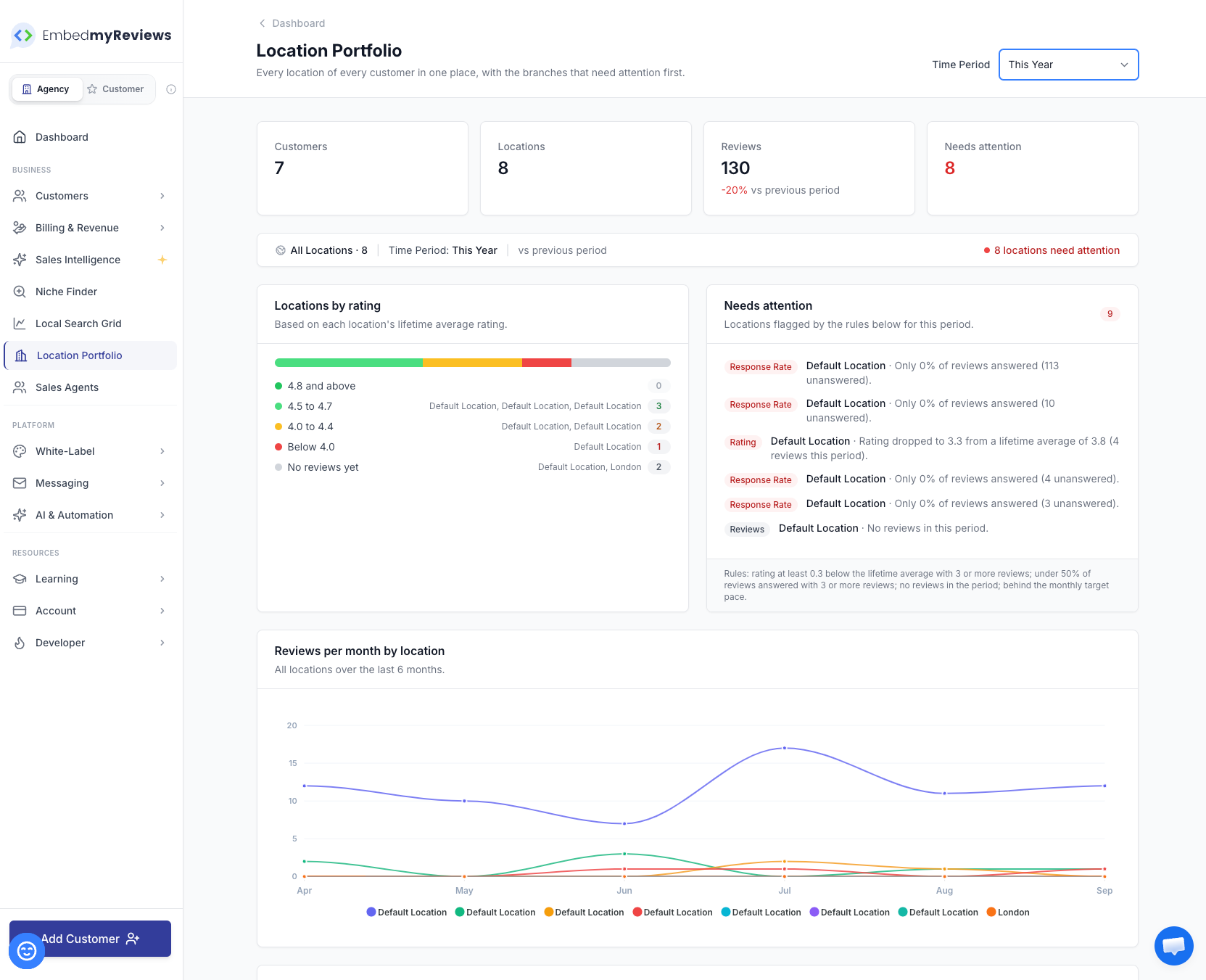
Needs Attention
Locations that may need action are automatically flagged.
This includes branches with:
A falling rating
Unanswered reviews
No connected review source
A stalled sync
The reason is shown in plain language so you immediately know what needs attention.
Google Business Profile by location
Google Business Profile performance can now be broken down by individual branch, including:
Views
Searches
Calls
Direction requests
Reports and shared dashboards
Multi-location reporting now carries through into reports and shared dashboards.
The summary PDF includes:
Location breakdown
Star distribution
Needs Attention list
Shared dashboards can open directly on the combined multi-location view.
Every report also clearly shows which organisation and location it covers.
Agency-wide Location Portfolio
There is also a new Location Portfolio page under Business.
This gives agencies one place to see:
Every customer
Every location
Which accounts are growing
Which accounts may need a call
Built for mobile
Multi-location reporting also works properly on a phone.
The location breakdown becomes mobile-friendly cards with a sort control, making it easier for managers to check performance while on the move.
Under the hood
Ratings, sentiment and date ranges are now calculated in one central place and reused throughout the platform.
That means your:
Dashboards
Reports
Location tables
all use the same calculations and stay in sync.