What's new: 12 to 17 September 2026
A busy week with new revenue tools, faster Google location setup, review photos in widgets, smarter search, improved notifications and a long list of fixes and reliability improvements.
New
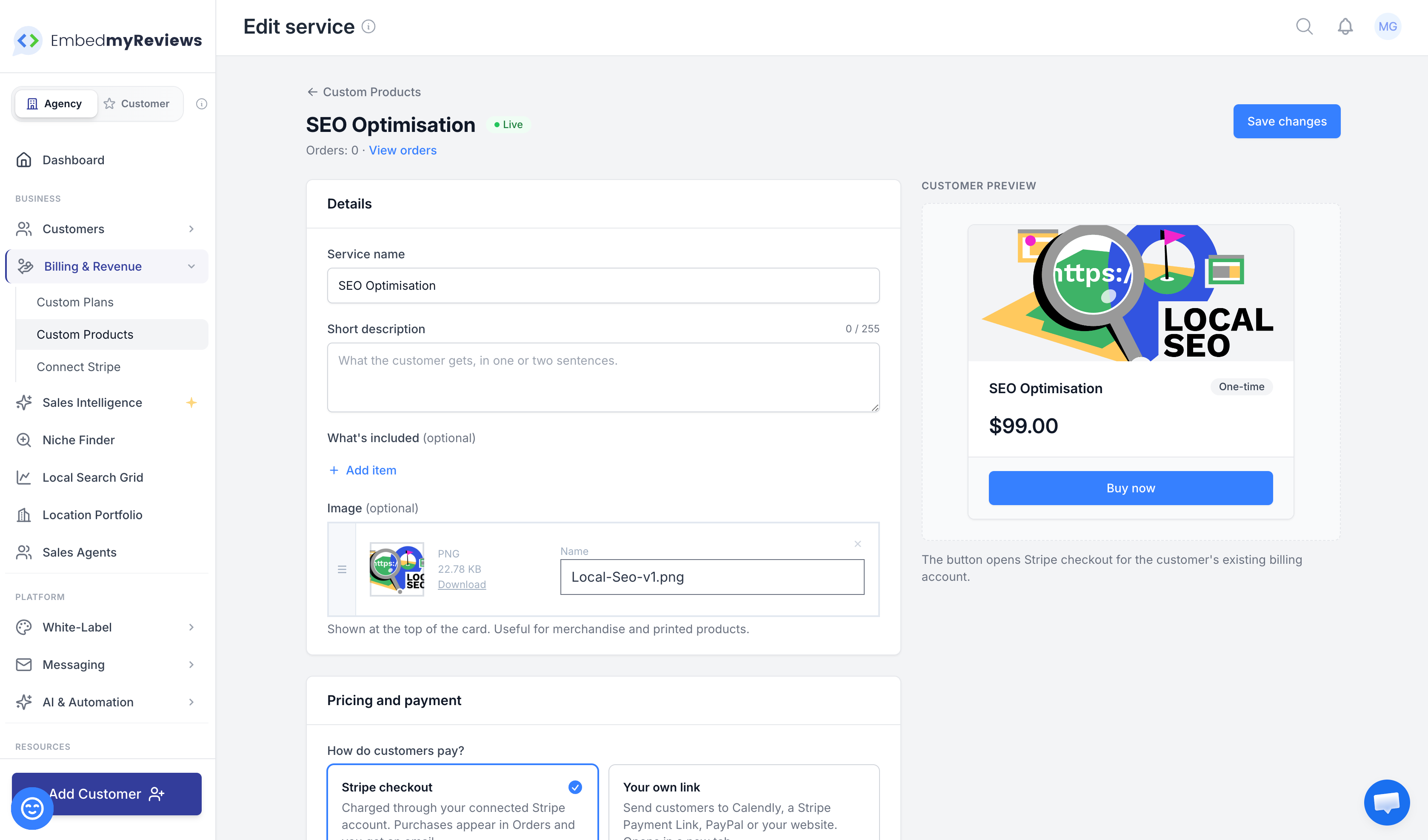
Sell your own services to your clients
You can now sell your own services directly from inside your clients' dashboard.
This can be used for things like:
Google Business Profile management
Ads retainers
Strategy calls
Courses
Monthly "remove branding" add-ons
Review stands
T-shirts
Other services or physical products
Set up
Go to:
Business → Billing & Revenue → Custom Products
Then click Create Product and choose Service or add-on.
Pricing
Services can be:
One-time
Monthly
Yearly
Payment
Clients can pay through Stripe Checkout using your own Stripe account.
You can also send them to your own external payment or booking link, including:
Calendly
PayPal
Your own website
Calendly and Cal.com links automatically open with the client's name and email already filled in.
Where clients see it
Clients now get a new Services page in their menu.
You can also feature up to three services directly on their dashboard.
After a purchase
Every Stripe purchase appears in Orders, and you'll receive an email notification.
For physical products, enable Collect a shipping address and fulfil the order from the Orders section.
Control who sees services
You can control Services access:
Per plan
Per individual client
Find this under:
Features & Options → General → Services Access
Import several Google locations at once
Connecting multi-location businesses to Google is now much faster.
When you connect Google, you can tick multiple Business Profile locations at once instead of reconnecting separately for every branch.
For each Google location, you can:
Match it to an existing location
Let us create a new location automatically
The remaining imports continue in the background while you carry on working.
Your plan's normal location limits still apply.
This also works through client connect links.
Photos in review widgets
Photos customers attach to their Google reviews can now appear inside your review widgets.
Visitors can click a photo to view it full size.
If you don't want review photos to appear, disable Review Photos inside the widget builder.

Search your Sales Pipeline
The Sales Pipeline now has a proper search box.
You can search using:
Business name
Town or city
Phone number
Email address
The search also handles small typos.
You can use shortcuts to narrow the results further:
stage:wonrating:<4city:leedsadded:7d
The Tips button lists all available shortcuts.
Exports now use the same search and filters, so you can export exactly what you're currently looking at.
Local Search Grid scans now use the same smarter search too.
Eight new social image designs
The social image designer now includes eight new designs for turning customer reviews into social posts.
The original classic design is still available.

Improved
Notifications are much easier to set up
The Notifications page has been redesigned to make setup much simpler.
Creating a notification
Choose what you want to be notified about:
New reviews
Private feedback
New customer signups
Service purchases
For reviews, you can also choose:
All reviews
Positive reviews
Negative reviews
Editing
Everything is now on a single page with one Save button.
Warnings
The notifications list now tells you when a notification hasn't been configured to reach anyone yet.
Send test
The test notification now follows your actual settings, so you can see exactly what a real alert will look like.
Fresh design for all emails
Platform emails have been redesigned, including:
Review alerts
Private feedback alerts
Reports
Exports
Review invites
Order emails
Emails now use your logo and brand colour and have been designed to display properly across:
Gmail
Outlook
Mobile devices
Using your own domain
The custom domain wizard now finishes with two simple steps:
Make your custom domain your main address.
Switch over to it in one click.
If you're still using your backup address, a banner will also offer to move you across.
Naming a new email, SMS or AI provider
When connecting a new email, SMS or AI provider, the connection name is now filled in automatically.
One less field to complete during setup.
All Locations table
The All Locations table on both the portfolio and client dashboards now displays 50 locations per page.
This keeps large multi-location portfolios quicker and easier to navigate.
Campaigns
Review invitations now send faster and more reliably.
Unverified Google profiles
If Google hasn't verified a client's Business Profile, Google may not provide access to its reviews.
The source card now explains what's wrong, including situations such as:
Verification is still pending
Another Google account owns the profile
It also explains what needs to be fixed.
Once the issue has been resolved, click Check again.
Replying to Google reviews
If a Google review reply cannot be posted because the Google connection needs refreshing, the reply window now:
Keeps your draft
Gives you a reconnect button
You no longer lose the reply you've already written.
Gmail sending limits
If you send review invitations through Gmail and reach Gmail's daily sending limit, the remaining invites now wait and send later instead of failing.
Fixed
Website builder
Reordering or deleting blocks no longer causes an error.
Removing a domain
You can now add a domain back after previously deleting it.
Local Search Grid setup
The setup wizard no longer sends some accounts back to the first step after they've already entered their details.
AI replies and insights
AI replies and AI Insights now work correctly with the newest OpenAI models.
Exports
Customer and review export emails now clearly show the date the download link expires.