Stripe: Automatic Plan Downgrade
What's New?
You can now automatically move customers to a free plan when their paid subscription ends, instead of blocking their access entirely. This keeps customers engaged with your platform even if they can't continue paying.
Why This Matters for Your Agency
Before: When a customer's subscription ended (cancelled or payment failed), they'd lose access completely. You'd have to manually manage these customers or risk losing them forever.
Now: Customers automatically transition to a free plan you define. They stay in your ecosystem, can still use basic features, and are more likely to upgrade again when ready.
Benefits:
Reduce churn - Keep customers engaged instead of losing them
Less manual work - No need to manually reassign plans for cancelled subscriptions
Better customer experience - Customers aren't suddenly locked out
Upsell opportunities - Free plan users are warm leads for future upgrades
How It Works
When a subscription ends, the system automatically:
Moves the customer to your chosen free plan
Sends them a notification email explaining the change
Logs the transition for your records
When does this trigger?
Customer cancels → Happens at the end of their billing period (not immediately)
Payment fails → Happens after Stripe exhausts all retry attempts (typically 1-4 weeks after the first failed payment)
Setup Instructions
Step 1: Create a Free Plan
If you don't already have one:
Go to Settings → White Label → Custom Plans
Create a new plan and tick "This is a free plan"
Configure the features/limits you want free users to have
Step 2: Set Your Default Downgrade Plan
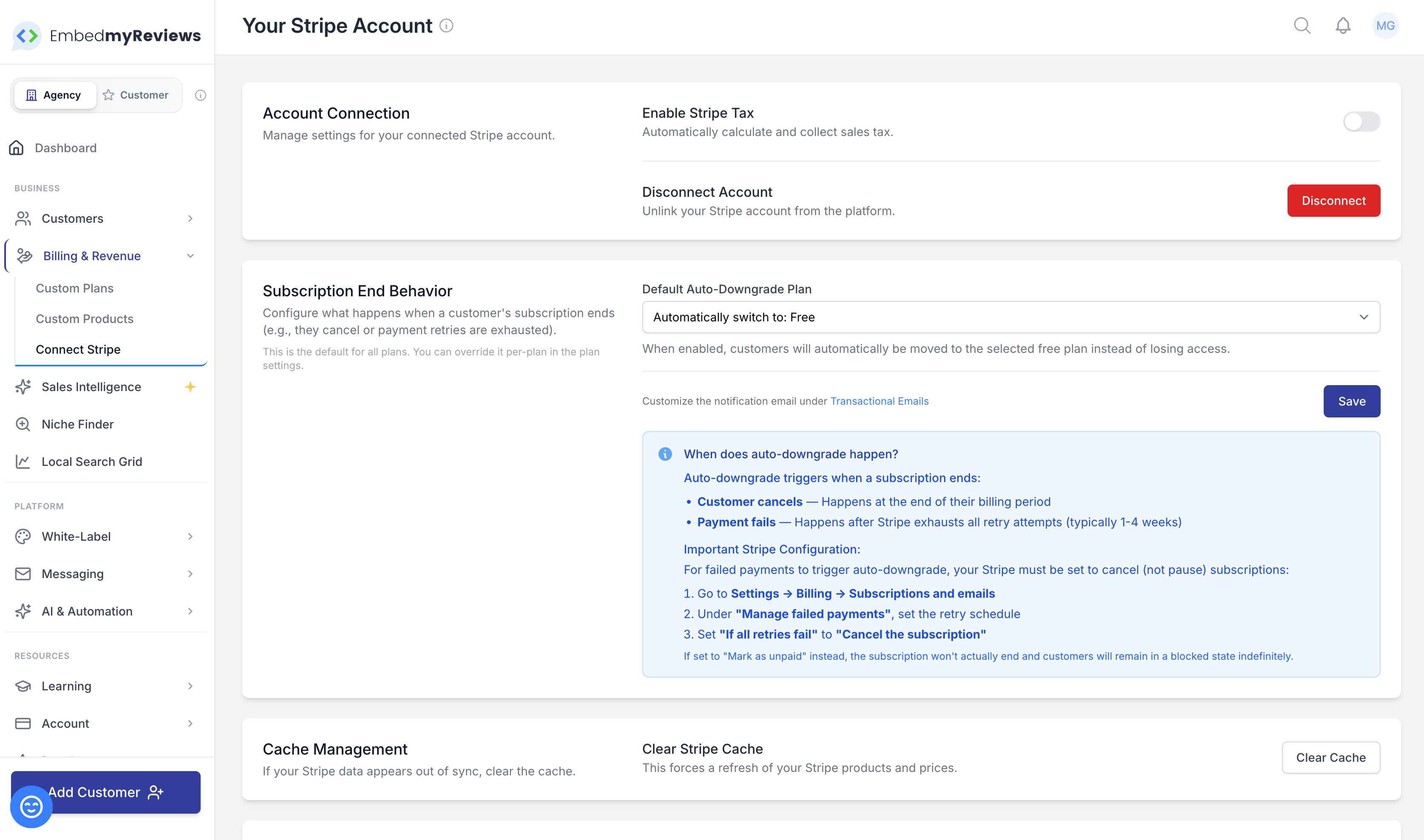
Go to Settings → White Label → Stripe Account
Find the "Subscription End Behavior" section
Select your free plan from the dropdown
Click Save
Step 3: Configure Stripe (Important!)
For auto-downgrade to work when payments fail, your Stripe account needs the right settings:
Log into your Stripe Dashboard
Go to Settings → Billing → Subscriptions and emails
Find "Manage failed payments"
Set "If all retries fail" to "Cancel the subscription"
⚠️ Why this matters: If set to "Mark as unpaid" instead, the subscription never officially ends, so the auto-downgrade won't trigger. Customers will be stuck in a blocked state indefinitely.
Step 4 (Optional): Set Per-Plan Overrides
Want different paid plans to downgrade to different free plans?
Go to Settings → White Label → Custom Plans
Edit any paid plan
In the "Subscription End Behavior" section, choose a specific free plan for that tier
Customise the Notification Email
When customers are downgraded, they receive an email. You can customise this:
Go to Settings → Transactional Emails
Find "Subscription Downgraded" template
Edit the subject, content, and styling to match your brand
Available placeholders:
{{ previous_plan_name }}- The plan they were on{{ new_plan_name }}- The free plan they've been moved to{{ new_plan_features }}- List of features in their new plan
Things to Know
Existing Stuck Customers
This feature only applies to subscriptions that end after you've configured it. Customers who are already in a failed/blocked state won't be automatically migrated. You'll need to handle those manually by either:
Assigning them to a free plan in their customer profile, or
Cancelling their subscription in Stripe (which will then trigger the auto-downgrade)
What if I don't set this up?
Nothing changes from current behaviour. Customers whose subscriptions end will simply lose access until they resubscribe.
Can I disable it later?
Yes! Just set the dropdown back to "Do nothing (block access until resubscribed)" and save.
Questions?
If you need help setting this up or have questions about how it works with your specific setup, reach out to our support team.