What's New, 24 April to 12 May 2026
A rundown of what's shipped over the last few weeks. Skim it, share what's useful with your team, and pass the highlights along to customers where it makes sense.
Customer Connect Links for Google & Facebook
You can now send a customer a tokenised link that lets them log in with their own Google or Facebook account and connect their Business Profile or Page on their own. They never need an account on the platform or need to sign-in. The flow has its own landing page, success screen, and expired-token screen, and the invitation can be sent by email straight from the customer modal or via the agency Customers API.

Arabic Language Support
The platform now ships a full Arabic translation (admin UI, campaigns, widgets, feedback forms, customer-facing pages) along with a right-to-left stylesheet so layouts flip correctly.
Smarter White-Label Theming
Brand, primary, and secondary colours now compute a readable text colour automatically based on contrast, so white text no longer disappears on light brand colours. Agencies can still override the text colour for each of the three brand colours from the theme form if they want full control.
Custom Email Designs
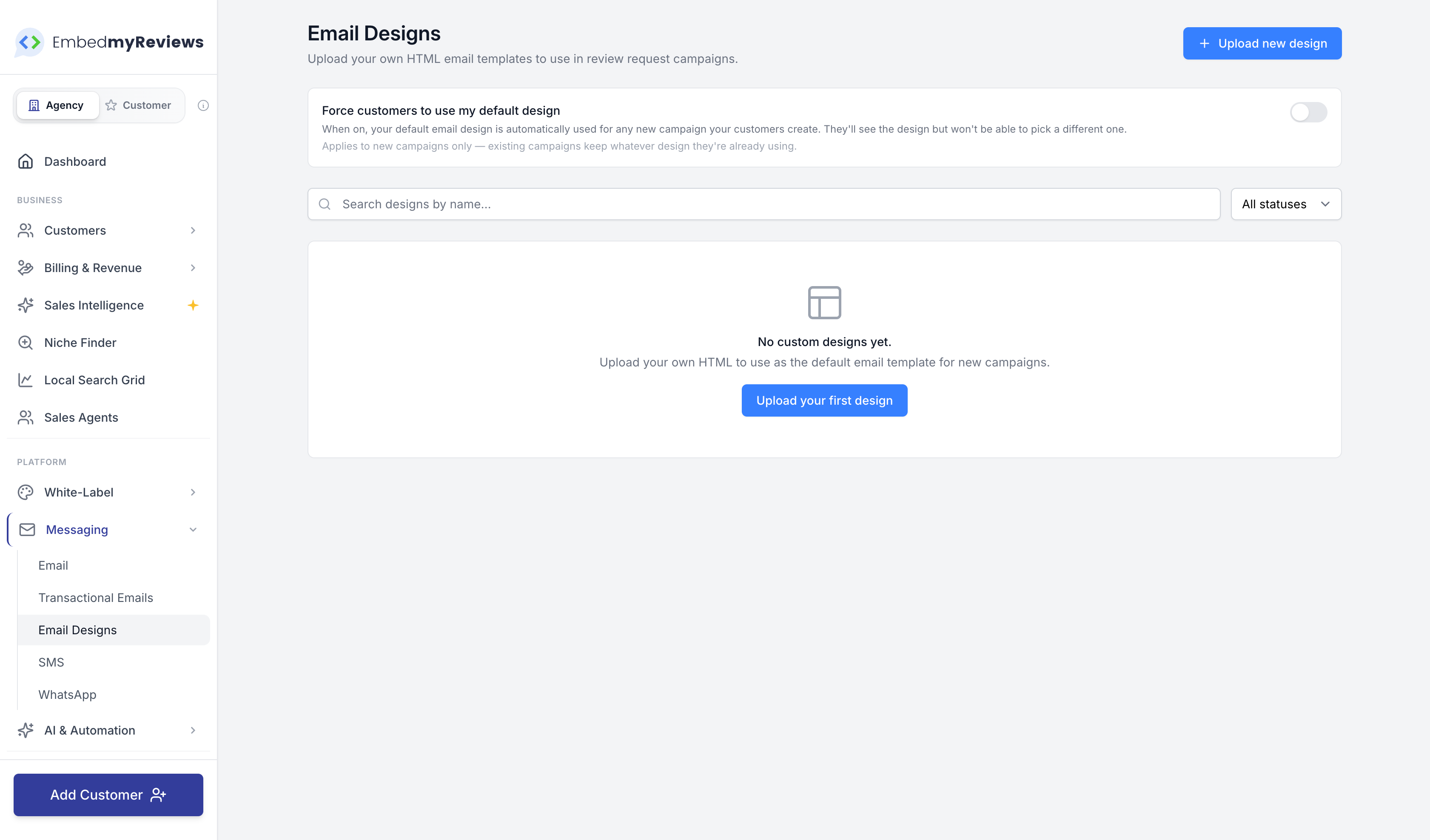
Agencies can upload their own raw HTML email templates and use them in campaigns. There's an upload/validate/preview flow, a token catalogue for merge fields, and an HTML sanitiser so bad markup can't slip through. Templates show up in the campaign builder template grid alongside the built-in ones.
Campaign Builder Reorganised
The campaign builder has been restructured into clearer tabs (Setup, Content, Appearance, Advanced) with separate sections for email, SMS, and WhatsApp channels and sub-sections inside email for sender info, subject and heading, message, CTA, footer, theme, and branding. Same features, easier to find things.
Edit Customer From Customer Manager
There's a new edit modal on the Customer Manager that lets you update a customer's name, email, phone, and language without leaving the page. Other fields (Organization details, Stripe customer) are intentionally left alone to avoid drift.
Google Business Profile: Search Keywords
GBP search keyword performance is now pulled in and surfaced on the customer dashboard and the agency customer dashboard. It shows how many people found a location with branded versus non-branded searches each month, with a configurable list of brand aliases so you can tune what counts as branded.
Connecting Thousands of Google Locations
The Google location picker now pages through results progressively with a one-hour cache, so connecting accounts that own thousands of locations no longer times out.
Facebook Sync Fix
Facebook review syncs were sometimes ending early when a page of results contained no reviewable items, even when more pages were available. The sync now walks the pagination directly instead of relying on the SDK helper, so you should see more complete history coming through.
Stripe Checkout Customisation
Stripe Connect account settings now expose options to collect the company name on checkout, require Terms of Service consent, and set a custom submit-button message. Tax ID collection is also wired in for subscriptions when the tax flag is enabled.
Local Search Grid as an Agency API
Local Search Grid scans are now driven through a proper REST API for agencies. You can create, list, run, schedule, and pull snapshots and insights for scans. There's a separate customer-facing API for GBP metrics and search terms too. Full reference is on the public API docs at https://www.embedmyreviews.com/docs/api/. Behind the scenes, scans now run on their own queue so they don't slow down notifications, exports, or other jobs.
MCP Tools for AI Assistants
If your customers connect Claude, ChatGPT, or another MCP-compatible assistant, the assistant can now run Local Search Grid scans, list and inspect scans and snapshots, view scan insights, and pull GBP metrics and search terms. Tools are visibility-gated so customers only see what they have access to.
Search AI Improvements
The Search AI scan pipeline has been reworked so the dashboard shows a processing state straight away when a scan starts, and per-query runs are handled better. Mention extraction, response classification, and the platform query executor have all been expanded for better quality results.
Social Image Builder
A new Social Template Onboarding Blueprint type lets agencies snapshot a social image design and have it automatically created inside every customer's account when a review source is connected. There's also a new shared tab navigation across the AI Insights, Reviews, Search AI, and QR analytics dashboards so getting between them feels consistent.
Widget and Feedback Form UI Refresh
The Collect Reviews and Display Reviews pages have been rebuilt with a cleaner card layout, better previews, and a tidier toolbar. Same actions, refreshed look.
Integration Manager Slide-Over
The "more info" modal on the Integration Manager has been replaced with a proper details panel. For direct-collection sources like Testimonials there's now a dedicated stats panel inline. TripAdvisor connections also now show a properly humanised listing name (for example "The Plaza, New York City") instead of the raw URL slug.
Custom Plan Fixes (Agency Feedback)
A handful of fixes from your weekly calls:
Custom plan prices now format in the agencies actual currency.
When switching a customer's plan, hidden and grandfathered plans now show up so you can move them onto those.
Add-on location billing confirmation pricing now formats correctly.
SMS & Twilio Fixes
Inbound and delivery-status Twilio webhooks were silently failing because the webhook handler was reading the wrong field shape from our internal data object. That's fixed, so STOP/START handling and message statuses come through again.
Toll-free verification cancel flow no longer leaves the SMS compliance wizard stuck on "Needs Verification" when a agency verifies their number directly in Twilio.
Twilio compliance review URLs now always use the agencies fallback subdomain instead of any custom domain they may have set, so Twilio's reviewers don't hit a dead link if a customer later changes their domain.
Email Send Errors
Some failed sends were not surfacing their actual error. The mail action now propagates failures properly so you see what went wrong instead of a silent miss.
That's the lot. Let us know if there's anything you want pushed up the priority list for the next round.