Private Feedback & Reviews Unified Inbox
What's New
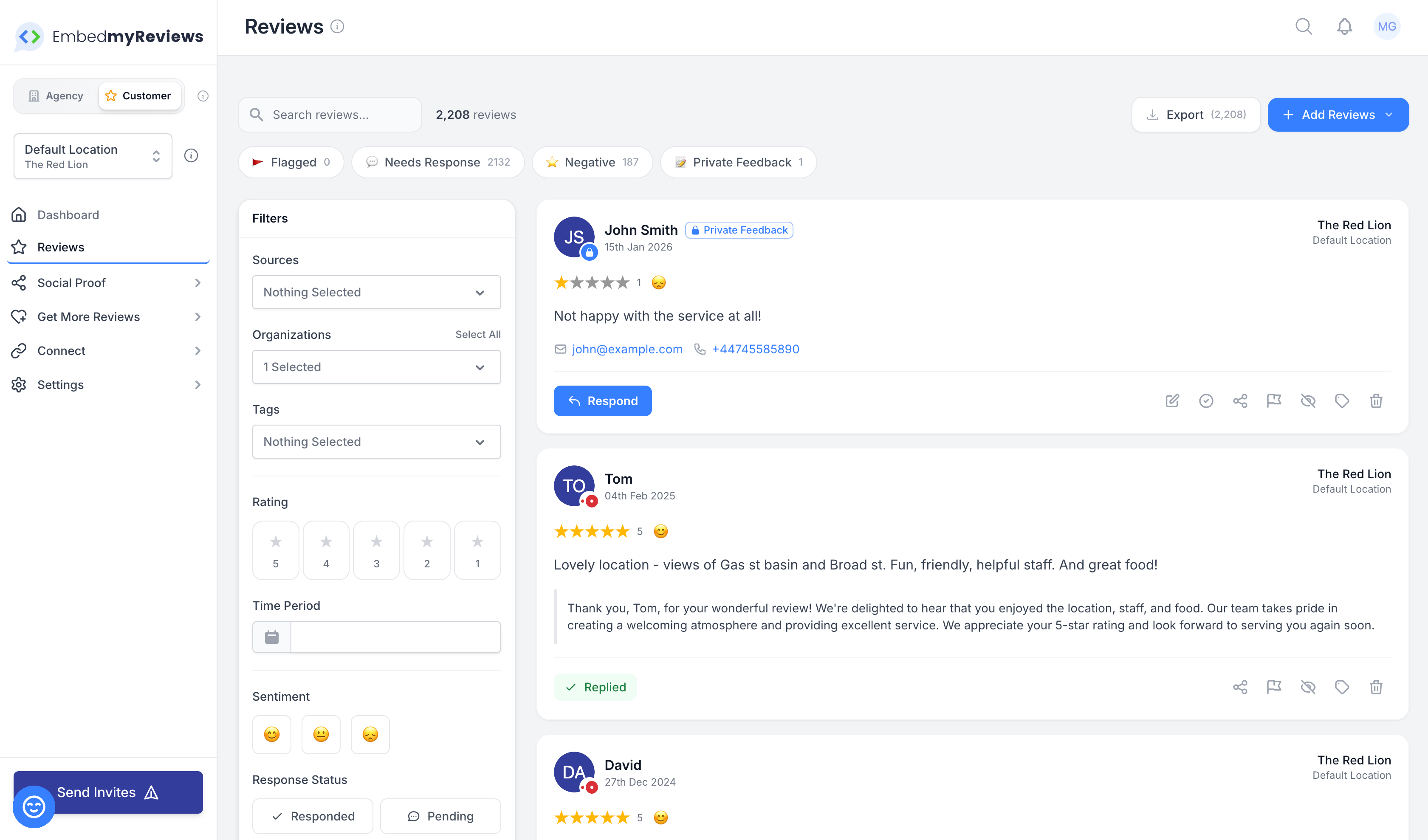
We've merged Private Feedback into your Reviews Inbox, giving you a single, unified view of all customer feedback in one place. The separate Private Feedback page has been retired—everything now lives in Reviews.
🎯 Why We Made This Change
Previously, private feedback (submitted through your feedback forms) lived in a separate section from your public reviews. This meant you had to check two different places to stay on top of customer sentiment and respond to feedback.
Now, everything is in one place—making it easier to:
See the complete picture of customer feedback at a glance
Respond to all feedback without switching between screens
Export all feedback together for reporting
Never miss important private feedback from customers
✨ Key Changes
1. Private Feedback Now Appears in Your Reviews Inbox
Private feedback entries are clearly marked with a "Private" badge so you can easily distinguish them from public reviews
They show the same information you're used to: customer name, rating, message, and contact details (email/phone when available)
2. New "Private Feedback" Quick Filter
A new quick filter button lets you instantly view only private feedback
The count updates dynamically based on your other active filters (like location, organization, or search)
Clear/reset filters now properly includes the quick filter
3. Smart Quick Filter Counts
All quick filter counts (Flagged, Unanswered, Negative, Private Feedback) now respect your applied filters
For example, if you filter by a specific location, the quick filter counts will show accurate numbers for just that location
This gives you a true picture of what needs attention within your current view
4. Respond to Private Feedback Directly
Click "Respond" on any private feedback to send an email reply to the customer
Uses the same AI-assisted reply generation you know from regular reviews
Respond button only appears when the customer provided an email address
5. Export Includes Private Feedback
When you export reviews, private feedback is now included
Email and phone information from private feedback is included in exports
Use the "Private Feedback" quick filter to export only private feedback if needed
6. Streamlined Actions
Private feedback items show only relevant actions (respond, flag, delete)
Share and hide options are hidden for private feedback since they're not publicly visible anyway
Edit is also hidden since private feedback content comes directly from customers
📊 For Your Dashboard
The Agency Customer Dashboard also shows private feedback in the Recent Reviews section, with the same "Private" badge and appropriate respond button for easy identification and action.
🔄 What Changed
💡 Tips for Your Team
Use the Quick Filters - Toggle between "Private Feedback", "Unanswered", "Negative", and "Flagged" to prioritize your response queue
Filter by Location First - The quick filter counts will update to show only relevant feedback for the selected location—great for multi-location businesses
Export for Reporting - Use filters + export to create targeted reports (e.g., "all private feedback from Location X this month")
Look for the Badge - The "Private" badge makes it easy to spot private feedback at a glance in any view
Check for Email - The Respond button only appears on private feedback when the customer provided an email address