New Year New Feature: Email-Triggered Invitations
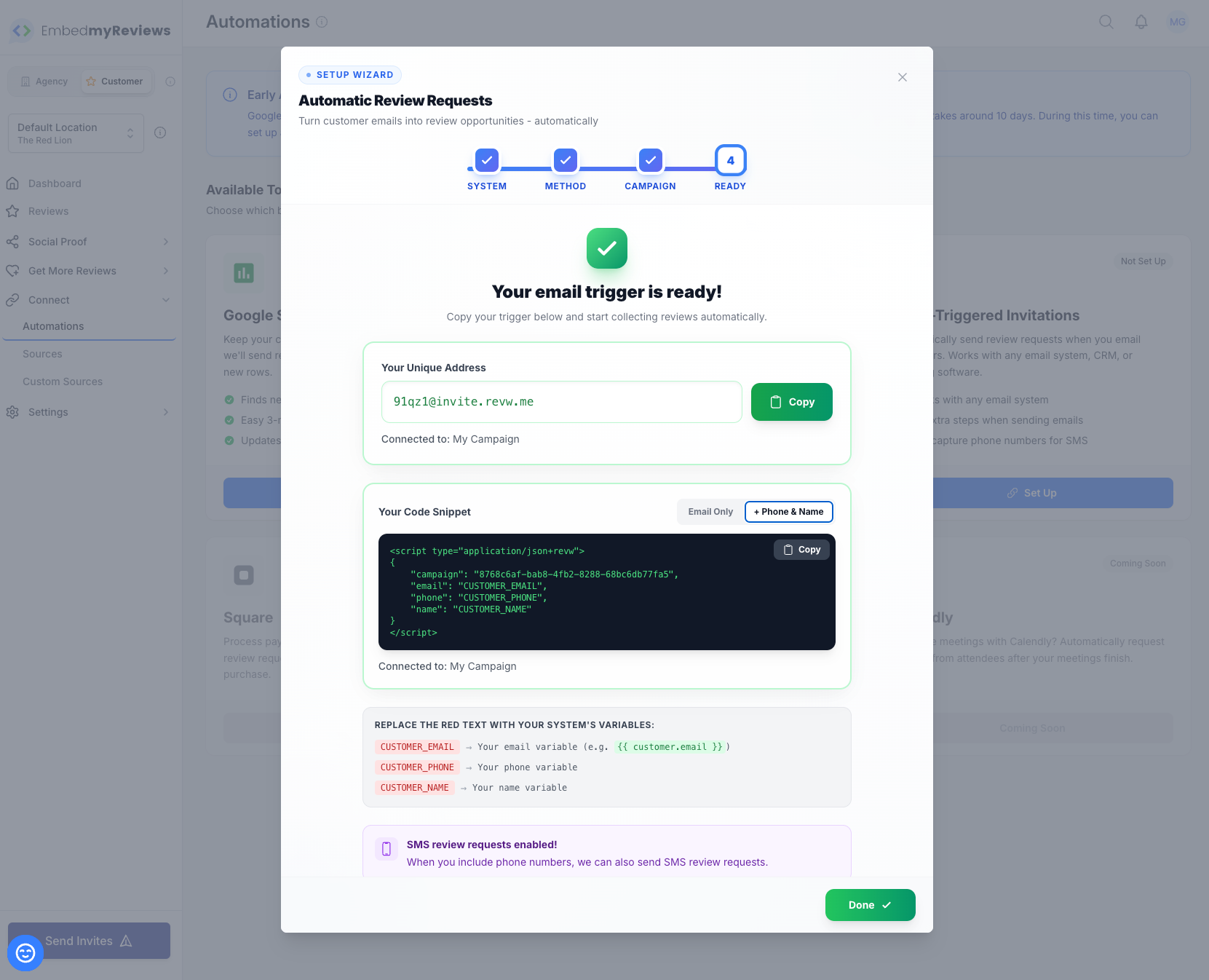
Automatically collect reviews from every customer email you send - without changing how you work.
What Is It?
Email-Triggered Invitations is a powerful new automation that turns your existing email workflow into a review-collecting machine. Every time you send an email to a customer - whether it's an invoice, a thank-you note, or a follow-up - your system can automatically send them a review request.
No new software to learn. No manual data entry. No copying and pasting customer details. Just add one simple line to your emails, and watch the reviews roll in.
Why This Changes Everything
The Problem Before
Getting reviews has always required extra work:
Manually entering customer details into your review platform
Remembering to send review requests after every transaction
Copying customer emails from one system to another
Missing opportunities because staff forgot to request reviews
The Solution Now
Email-Triggered Invitations eliminates all of this. Your existing business emails - the ones you're already sending - now do double duty. Send an invoice? Review request goes out. Send a booking confirmation? Review request goes out. Send a thank-you email? Review request goes out.
Zero extra steps for your team. Maximum review collection.
Works With Every Platform You Already Use
This feature integrates seamlessly with virtually any system that sends emails:
CRM & Sales Platforms
HubSpot - Trigger review requests from sales emails, deal closures, or customer touchpoints
Zoho CRM - Connect your customer communications to automatic review collection
Salesforce - Turn every customer interaction into a review opportunity
Pipedrive - Close a deal, get a review
Invoicing & Accounting
QuickBooks - Every invoice becomes a review request
Xero - Payment confirmations trigger reviews
FreshBooks - Bill a client, request a review
Wave - Small business invoicing with built-in review collection
Email Marketing
Mailchimp - Add review triggers to your campaigns
Constant Contact - Turn newsletters into review generators
ActiveCampaign - Automate reviews as part of your sequences
Klaviyo - E-commerce email flows that collect reviews
Booking & Scheduling
Calendly - Appointment confirmations that request reviews
Acuity Scheduling - Service bookings become review opportunities
Square Appointments - Every booking, every review chance
Customer Service
Zendesk - Resolved tickets trigger review requests
Freshdesk - Happy customer? Get that review
Intercom - Turn support success into social proof
E-commerce
Shopify - Order confirmations that collect reviews
WooCommerce - Purchase emails become review requests
BigCommerce - Every sale, every review opportunity
Any Email Client
Gmail - Works with your everyday emails
Outlook - Perfect for service businesses
Apple Mail - Simple setup, powerful results
Any SMTP email - If it sends email, it works
Two Powerful Methods
Method 1: BCC Trigger (Simplest)
Perfect for: Manual emails, small teams, quick setup
Just add your unique trigger address to the BCC field when you send any email. That's it. The customer's email address is automatically captured, and a review request is sent.
How it works:
Compose your normal email to a customer
Add your unique trigger address to BCC
Send your email as usual
Review request is automatically sent to your customer
Best for:
Gmail, Outlook, Apple Mail users
Service businesses emailing clients directly
Teams who want the simplest possible setup
Method 2: Code Snippet (Most Powerful)
Perfect for: Email templates, CRM automations, high-volume senders
Add a small, invisible code snippet to your email templates. This method captures not just the email, but also the customer's name and phone number - enabling both email AND SMS review requests.
How it works:
Add a tiny code snippet to your email template
Use merge fields to automatically fill in customer details
Every email sent from that template triggers a review request
Optionally send SMS follow-ups for better response rates
Best for:
CRM and marketing automation platforms
Invoice and booking confirmation emails
High-volume businesses wanting maximum data capture
Teams who want SMS + email review requests
Key Benefits
For Your Agency
Increase Client Retention Clients who see a steady stream of reviews are happy clients. This feature makes review collection effortless, meaning better results and longer contracts.
Differentiate Your Service Offer something competitors can't - seamless integration with any platform your clients already use. No more "you need to use our specific tools" conversations.
Reduce Support Requests No more manually importing contacts or troubleshooting complex integrations. Set it once, and it works forever.
Scale Effortlessly Whether your client sends 10 emails a day or 10,000, the system handles it automatically.
For Your Clients
No Learning Curve They keep using the tools they already know. No new software, no training, no behaviour change required.
Never Miss a Review Opportunity Every customer interaction becomes a potential review. No more "we forgot to ask" situations.
Better Response Rates Review requests that arrive close to the customer experience get better response rates. This automation ensures perfect timing.
SMS + Email for Maximum Impact With the code snippet method, send both email and SMS review requests - dramatically increasing response rates.
How to Set It Up
Step 1: Access the Feature
Log into your dashboard
Click Customer in the sidebar
Navigate to Connect > Automations
Select Email-Triggered Invitations
Click Set Up
Step 2: Follow the Setup Wizard
The guided wizard walks you through everything:
Choose Your Campaign - Select which review campaign should receive the contacts
Select Your Method - BCC Trigger or Code Snippet
Get Your Unique Address/Code - Copy it to use in your emails
Test It - Send a test email to confirm everything works
Step 3: Add to Your Emails
For BCC Method:
Add your unique trigger address to the BCC field
That's it - you're done!
For Code Snippet Method:
Add the snippet to your email template
Replace the placeholder values with your platform's merge fields
Save your template
Real-World Examples
Example 1: The Accountant
Sarah runs a small accounting firm. After completing a tax return, she sends a thank-you email to her clients. Now, she simply adds her trigger address to BCC. Every thank-you email automatically triggers a review request. In 3 months, her Google reviews went from 12 to 47.
Example 2: The Home Services Company
Mike's plumbing company uses ServiceTitan for invoicing. His admin adds the code snippet to their invoice email template. Now, every completed job automatically generates a review request - including the customer's name and phone number for SMS follow-up. Review volume increased 340%.
Example 3: The Marketing Agency
A digital marketing agency manages 50 clients, each using different CRMs and tools. Instead of building custom integrations for each, they train clients to add a BCC address or snippet to their existing workflows. Setup time dropped from hours to minutes per client.
Example 4: The E-commerce Store
An online retailer adds the code snippet to their Klaviyo post-purchase email flow. Every order confirmation now includes an invisible trigger. Reviews are collected automatically, and customer names are captured for personalised follow-up.
Frequently Asked Questions
Q: Will customers see the trigger address or code? No. The BCC address is never visible to recipients. The code snippet is completely invisible - it renders as hidden text that customers never see.
Q: What if I send emails to multiple recipients? Each recipient in the To: field will receive a review request (when using BCC method). With the code snippet method, you control exactly which customer details are captured.
Q: Can I use this with my existing campaigns? Yes! Email-Triggered Invitations connects to your existing review campaigns. You choose which campaign each trigger is connected to.
Q: What happens if the same customer is emailed twice? The system handles duplicates intelligently, respecting your campaign's settings for contact frequency.
Q: Is there a limit to how many emails I can process? No artificial limits. The system scales with your needs.
Q: Do I need technical knowledge to set this up? Not at all. The setup wizard guides you through everything in plain English. Most users are up and running in under 5 minutes.
Getting Started Today
Email-Triggered Invitations is available now. To activate:
Go to Customer > Connect > Automations
Click Email-Triggered Invitations
Click Set Up and follow the wizard
Start turning every customer email into a review opportunity - automatically.