Onboarding Blueprints: What's New
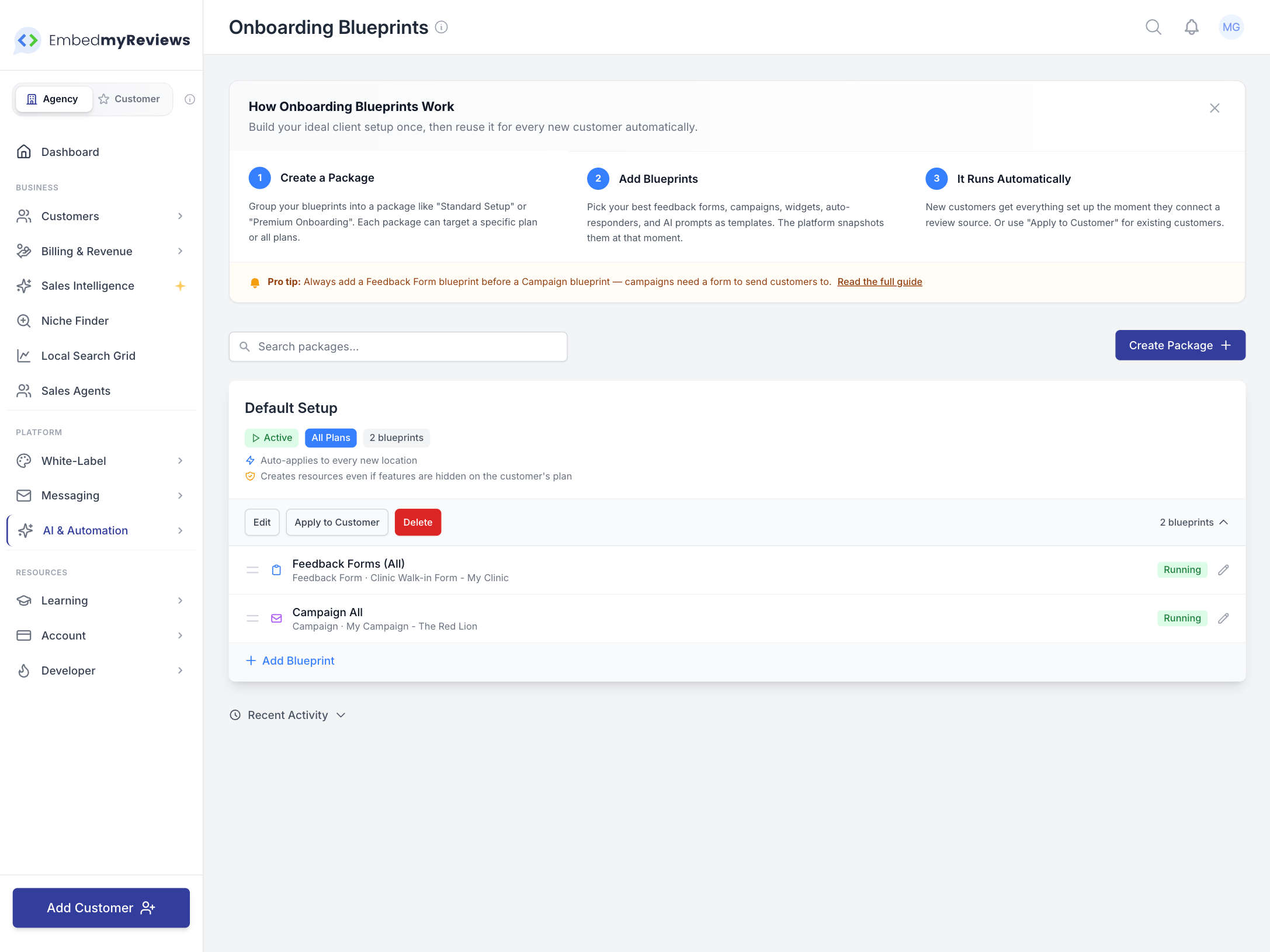
Packages
Blueprints are now organized into packages. Instead of a flat list of individual blueprints, you group them together into named packages like "Standard Setup" or "Premium Onboarding." Everything in a package gets applied together as a set, which makes it much easier to manage what each customer gets.
Each package can be assigned to a specific Custom Plan, so the right setup automatically matches the right customers. Or leave it on "Apply to all plans" if one size fits all.
You can pause a package without deleting it. Paused packages won't run automatically for new customers, but you can still apply them manually whenever you want.
Setup Wizard
Creating a package is now a guided four step process instead of a blank form. The wizard walks you through naming your package, choosing what to include, picking your templates, and reviewing everything before you create it. It takes about a minute to set up a complete onboarding flow.

Two New Blueprint Types
Packages now support Auto Responder and AI Prompt blueprints alongside the existing Feedback Form, Campaign, and Widget types. That means you can now include automatic review reply rules and custom AI response instructions as part of your onboarding setup. New customers get their auto responder and AI prompt created for them automatically, just like forms and campaigns.
Apply to Customer
There's a new Apply to Customer button on every package. This lets you manually apply a package to existing customers who were set up before you created the package, or to customers you want to set up on demand.
You can search for customers by name or email, browse their locations, and select exactly which ones to apply to. You can even queue up multiple customers and locations in one go before hitting Apply.
Locations that are already set up won't get duplicates. The system checks what already exists and skips anything that's already there.
Progress Tracking
When you apply a package, you now get a real time progress view showing each location as it gets processed. You can see the overall progress bar, how many locations succeeded, failed, or were skipped, and drill into individual locations to see exactly which blueprints were created.
If you close the progress window, the work keeps going in the background. An active run banner appears at the top of the Onboarding Blueprints page so you can check back anytime by clicking View Progress.
Location Locking
While a package is being applied, the affected locations are temporarily locked so you can't accidentally apply the same package twice at the same time. Once the run finishes, the locations unlock and you can apply again if needed.
Bypass Plan Restrictions
Packages now have a "Bypass plan restrictions" option. When enabled, the package creates everything even if the customer's plan doesn't normally include certain features. This is useful for VIP clients, trials, or situations where you want to give a customer more than their plan would usually allow.

Dependency Enforcement
The system now understands that Campaigns depend on Feedback Forms. If you try to add a Campaign without a Feedback Form in the same package, you'll get a warning. If you try to remove a Feedback Form while a Campaign still exists, it will be blocked. This prevents broken setups where a campaign has no form to send customers to.
Activity Log
The main page now includes a Recent Activity section at the bottom showing the last 10 blueprint applications. You can see which customer, which location, which blueprint was applied, and whether it succeeded, was skipped, or failed. This gives you a quick audit trail without digging through individual locations.
Improved Source Selection
The dropdown menus for selecting source templates (when picking which form, campaign, or widget to use as a template) now show the organization name alongside the resource name. So instead of just seeing "Standard Form," you'll see "Standard Form - Acme Corp." This makes it much easier to find the right one when you have many resources across different organizations.
Auto Responder and AI Prompt sources now show in the same format, and sources without a valid organization are automatically filtered out to keep the list clean.
Quick Start Guide
The Onboarding Blueprints page now includes a collapsible quick start guide right at the top. It explains the three core concepts (create a package, add blueprints, it runs automatically) and includes a pro tip about the feedback form and campaign dependency. You can hide it once you're familiar with the feature.
Want to understand how and when to use Onboarding Blueprints? Click here